
Real Geeks has two developer APIs, and they are different systems with different authentication:
- The Leads API moves leads and their activity between the Lead Manager CRM and other products.
- The Content API Beta reads and edits a Real Geeks website itself, from code or with the open-source geekcli command line.
Leads API
Use the Incoming Leads API to send leads into your Lead Manager CRM from any source, and the Outgoing Leads API to receive a notification every time a lead signs up or does something on your website. You have full access to leads coming in and out of Real Geeks — not only the lead details but also all activities they perform, like searching and viewing properties. All in real time. Reference: Leads, Activities, Users.
Authentication: each product that integrates is registered with Real Geeks and receives its own username and password, sent with every request as HTTP Basic auth. Request access to get registered.
The diagram below gives an overview of how leads flow through our platform:
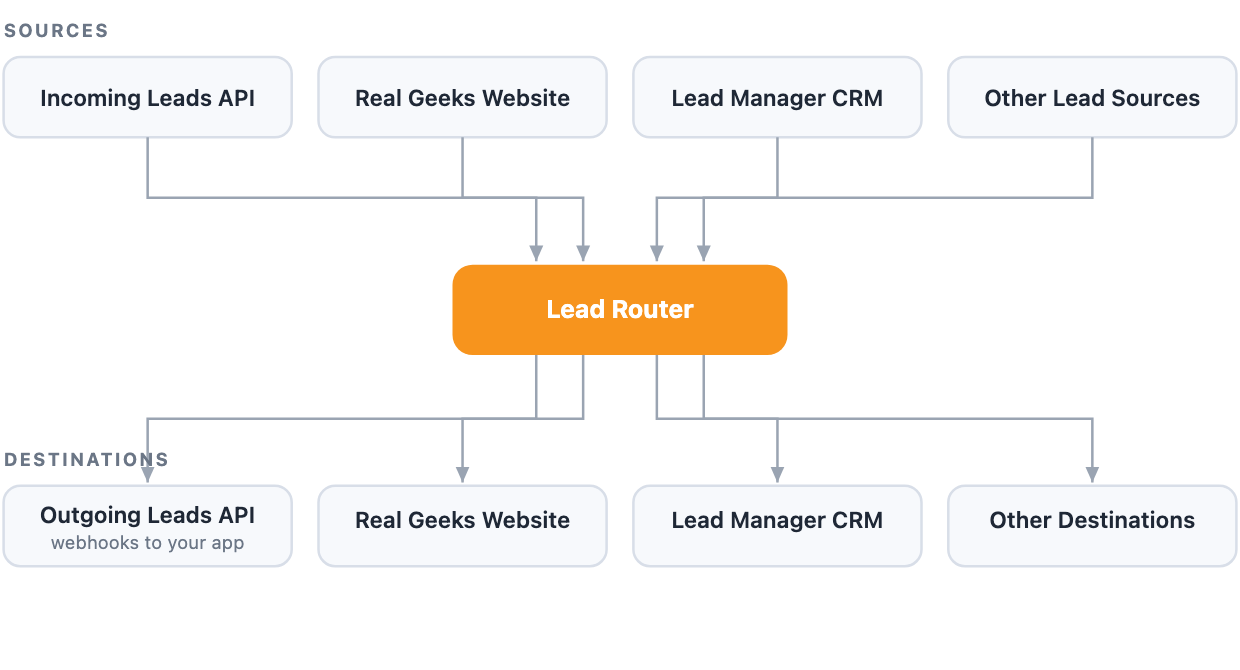
You can use multiple lead sources, the most common is your Real Geeks Website. We support other sources out of the box, like Zillow.com and Realtor.com, and you can use the Incoming Leads API to send leads from anywhere you want. Once a lead is generated from a source it goes to your destinations, the most common is the Lead Manager CRM. Other destinations we support include BombBomb and Wise Agent. And you can build your own destination that will receive leads and activities as they come in.
Content API Beta
The Content API is a JSON API for the website itself, served on the site’s own domain under /api/v3/. It reads and edits blog posts and categories, content pages, area pages and the home page, navigation, sidebars and footers, and the site’s design, settings and uploaded files — built for third-party integrations, command-line tools and AI agents.
Authentication: per-site API keys, sent as Authorization: Bearer rg_live_.... Site owners create keys themselves in their site admin — no registration with Real Geeks — with scopes limiting what each key can do; keys expire and can be revoked at any time. The API is in beta and is on for every Real Geeks website, so there is nothing to request: create a key in your site admin and start.
Command line: geekcli is the open-source Real Geeks CLI for the Content API, built for scripts and AI agents. geekcli auth login gets a key through the site owner’s browser approval.
curl -fsSL \
  https://raw.githubusercontent.com/
realgeeks/geekcli/main/install.sh | sh
Start with the Content API overview for authentication, conventions and the full endpoint reference, or the command line section.

